General Guidelines for Classes- Digital Marketing Course
General Guidelines for Classes
1. Class Levels & Sequence:
Participants must begin with Part 1 classes, such as Google Ads 1, SEO On Page 1, and others. Sequential learning is required, meaning that Part 1 must precede Part 2 within any given module. A specific sequence must be maintained within each module, including SEM, SEO, and SMM.
2. Booking & Scheduling:
Students must continue with at least two topics from any module in sequential order. Google Analytics classes are restricted until completion of Google Ads 1 and 2 or all other classes. Loft classes are available at any time according to the schedule. Various options for days and time slots are available, including Weekdays or Weekends and Morning or Evening. Classes must be booked at least 3 hours in advance through the student portal.
3. Technical Requirements:
Participants are required to have a personal laptop to practice digital marketing concepts. Installation of the Zoom application on the laptop is mandatory before class commencement.
4. Lifetime Privileges:
London International offers lifetime access to the course with one-time payment. The course does not have an expiration date, providing ongoing validity. Flexibility is offered in scheduling, with both Online and Offline options. Four accredited certificates are provided from Dubai, UK, and US.
II. Modules and Topics
1. Search Engine Marketing (SEM):
Comprising Google Ads 1 & 2, Google Analytics, Google Analytics 2 and Data Studio, and Tag Manager & Affiliate Marketing Introduction.
2. Search Engine Optimization (SEO):
Including SEO On Page 1 & 2 and SEO Off Page 1 & 2.
3. Social Media Marketing (SMM):
Covering Facebook and Instagram-1 & 2, LinkedIn and Snapchat, Twitter and Tik Tok, and Loft for website creation class.
III. How to Book, Attend, and Access Classes
1. Booking a Class:
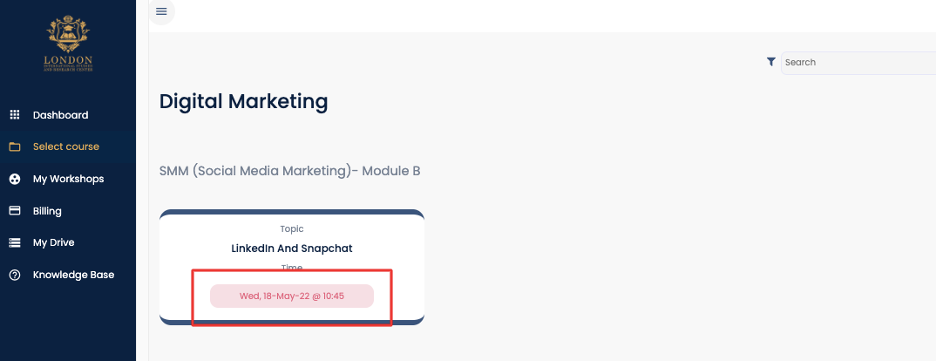
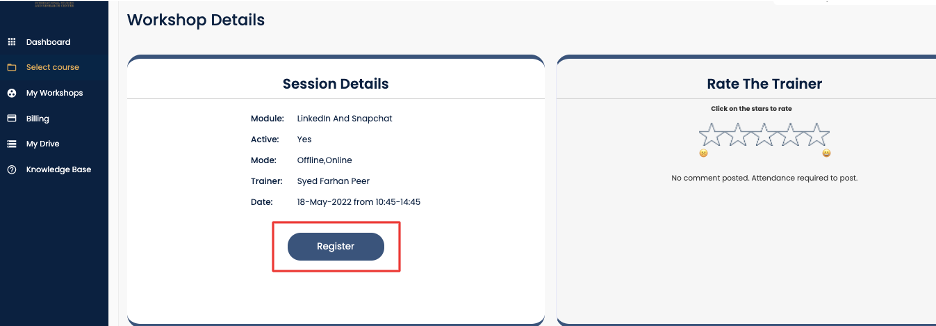
Select the desired class, date, and time, then click on the registration option. Confirming the selection will book the class.
2. Attending a Class:
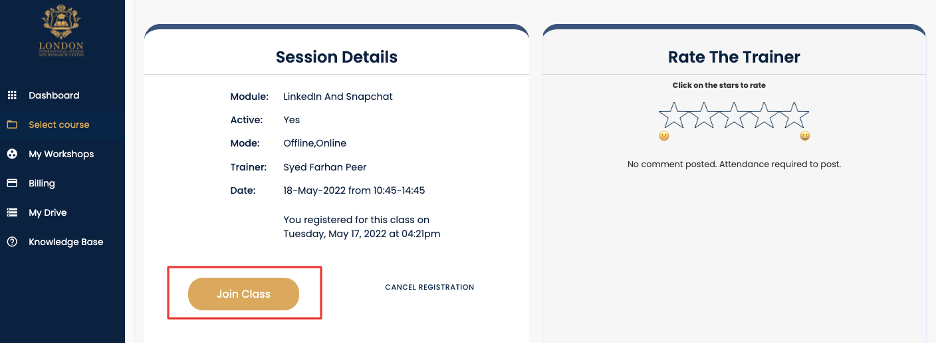
Log into the student portal, navigate to the "My workshops" section, and select the "Registered Tab." The registered class will appear, and the student can enter the classroom by clicking the "JOIN CLASS" button.
3. Accessing Study Materials:
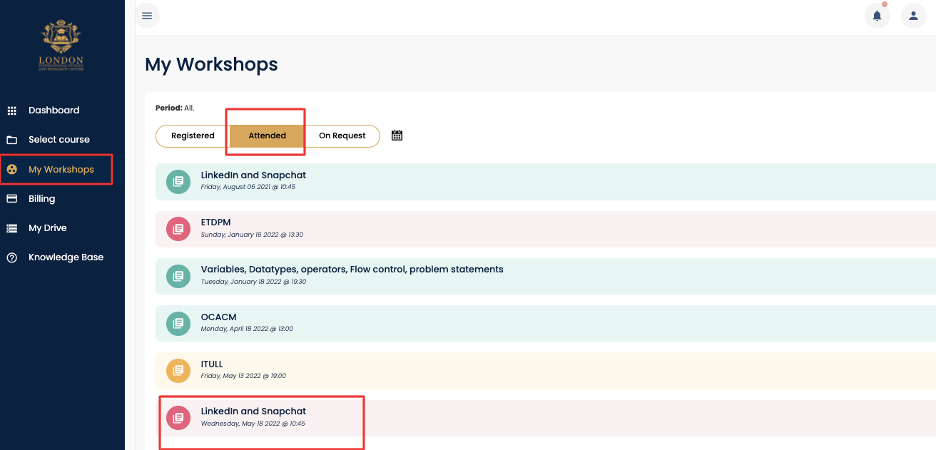
To find study materials after attending a class, click on "My workshops," select the "attended" tab, and choose the corresponding topic to access class recordings.
4. Rating and Feedback:
Students have the opportunity to rate the trainer and submit feedback after the class by clicking on the stars and submitting their responses.
This expanded knowledge base provides a comprehensive understanding of the digital marketing classes, procedures, and benefits provided by London International. It aims to guide students through every stage of their learning experience, from initial booking to class completion, while emphasizing the unique benefits and requirements of the course.
Related Articles
Frequently Asked Questions - Digital Marketing Course
Frequently Asked Questions - Digital Marketing Course General Course Information Q: Which class should I take first if I'm new to the course? A: If you're starting fresh, you may choose from SEO On Page 1, Google Ads 1, LinkedIn and Snapchat, Twitter ...How to Join Your CMA Classes with Ease: A Step-by-Step Guide | London International
How to join the class? You can join the class with 1 simple step: Login to the student portal and simply click on JOIN CLASS button. You’ll be directed to zoom. Click on lunch zoom meeting, you’ll be logged into classroom. Key Point to remember: ...